FiveM HUD Guide: What Matters for a Modern Roleplay Server
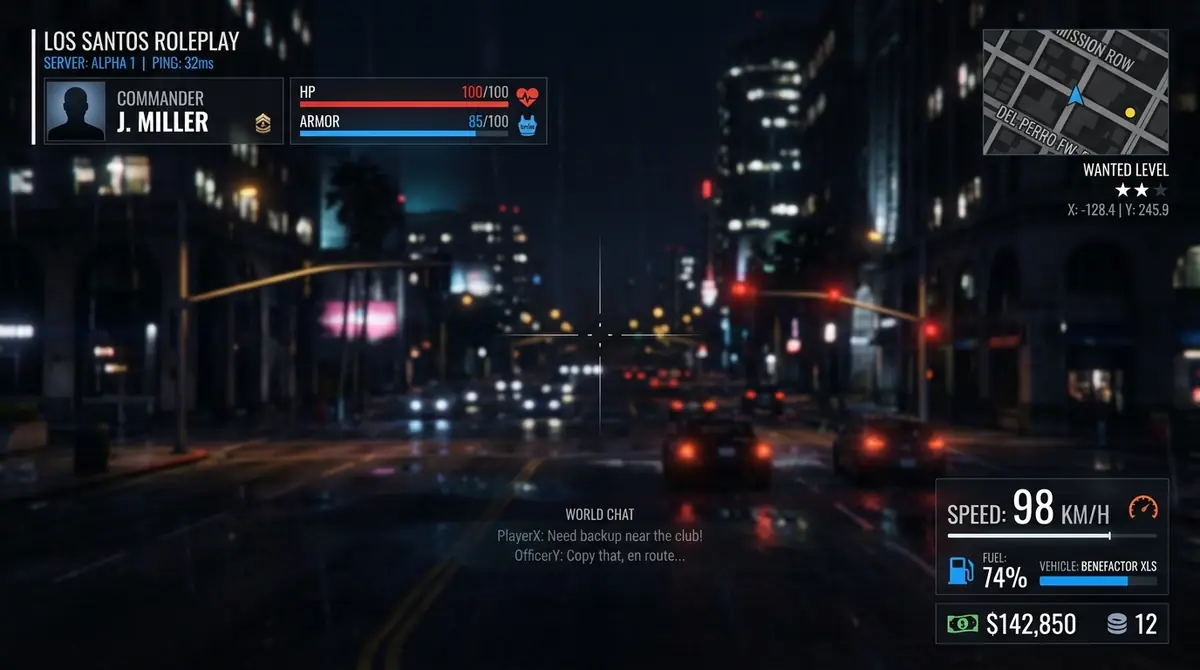
A good FiveM HUD should answer one question quickly: what does the player need to know right now? If the answer is hidden behind oversized panels, noisy animations, or information that never changes, the HUD is working against the roleplay experience.
In FiveM, a HUD is usually an in-game interface for the server: it can show player status, location, job and money, then switch to vehicle, weapon, radio, or interaction information when the situation requires it. The best implementation is not the one with the most boxes. It is the one that keeps important information readable without competing with the world.
Start with information hierarchy
Before comparing colours or screenshots, split the interface into three levels:
- Always useful: health, armor, voice state, ID, job, or a compact server identity.
- Useful in context: hunger, thirst, stress, stamina, oxygen, weapon and radio information.
- Vehicle-only: speed, RPM, gear, fuel, engine condition, mileage, headlights, seatbelt and cruise control.
This hierarchy prevents a common design mistake: displaying every available value at full visual weight all the time. A player should be able to glance at the screen and find health or a seatbelt warning immediately. A less urgent value, such as mileage, can be quieter or hidden until the vehicle HUD is active.
The features that actually matter
Player status that matches your server
Health and armor are universal. Hunger, thirst and stress are framework- or resource-dependent, so a HUD must handle missing data gracefully instead of showing misleading zero values. Stamina and oxygen are also contextual: oxygen is relevant underwater, while stamina is useful during long movement or combat.
Look for three controls:
- a way to hide individual modules;
- a way to choose whether a status is always visible, hidden, or dynamic;
- sensible defaults for servers that do not run a particular needs or stress resource.
Server information without clutter
Server ID, time, ping and job can be helpful for staff and roleplay. They do not all deserve the same prominence. A compact server information group is generally more useful than four disconnected panels around the screen.
The interface should also make it clear which values are informational. A displayed cash balance, for example, is not permission to change money. State-changing actions still belong in server-side logic.
A vehicle HUD that follows the driving task
The vehicle HUD should become visible when the player is in a vehicle and disappear when it is not needed. Speed and gear should be readable at a glance. RPM, fuel and engine condition should have clear visual states. Seatbelt, headlights and cruise indicators should communicate active and inactive states without relying on colour alone.
This is where many attractive HUDs become hard to use: the speed number is huge, but warning states are tiny; the UI looks good in a screenshot, but it is unreadable on a different aspect ratio. Test it at 16:9, ultrawide and lower resolutions before calling it responsive.
Layout and accessibility controls
Different servers use different safe areas, minimap styles and visual identities. Players also have different displays and preferences. A useful HUD should support:
- module visibility;
- theme selection with readable contrast;
- layout movement and scale;
- resolution-aware positioning;
- reduced motion behaviour where possible;
- keyboard and mouse controls that do not trap the player in a menu.
Customisation should have guardrails. An editor that lets a player drag an element off-screen without an easy reset is technically flexible but practically frustrating. Include restore defaults and keep saved layout values in a stable design space so a layout does not break when the resolution changes.
Performance is part of the UI design
A HUD is a long-running resource, so performance cannot be judged only by whether the menu opens quickly. The client may need to read game state continuously, but it does not need to send the complete UI payload every frame.
Prefer separate update rates for different data:
- fast updates for vehicle values while driving;
- slower updates for player information and server time;
- event-driven updates for voice and radio state;
- server-controlled, rate-limited updates for ping or permission-sensitive information.
The client should also compare the new payload with the previous payload and send a NUI message only when something changed. Cfx.re warns that a loop without a wait can freeze the client and recommends avoiding expensive native calls every tick. Read the Citizen.Wait guidance.
What to check before choosing a HUD
Use this checklist before installing any resource:
- Does it document supported frameworks and dependencies?
- Does it handle ESX, QBCore, Qbox, or standalone honestly?
- Are stress, hunger, thirst, fuel, inventory and voice integrations explained?
- Can players reset or customise the layout safely?
- Does the vehicle UI hide itself when it is not relevant?
- Are UI actions validated outside the client?
- Is the resource maintained with a changelog and support path?
- Does the documentation explain what is configurable versus escrowed?
- Has it been tested on the resolutions your players actually use?
How Zloma HUD approaches the problem
Zloma HUD is built as a configurable in-game server interface rather than a single static overlay. It supports player status, server information, compass and street display, money and job information, vehicle data, weapon and radio UI, themes, module visibility, layout editing, perspective settings, minimap styling, stress and mileage systems, and multiple framework integrations.
The useful part is not a list of features by itself. It is the ability to turn off what your server does not need, keep contextual information contextual, and give players control over the layout without asking every server owner to edit frontend code. You can review the current compatibility and product details on the Zloma Scripts product catalogue.
Final takeaway
Choose a FiveM HUD by its information hierarchy, compatibility, update strategy and real behaviour under load. A clean interface helps players understand the server. A configurable interface helps the server grow. A trustworthy resource explains both its capabilities and its limits.
Keep learning
How to Build a FiveM NUI HUD with Lua and React
Learn the core architecture behind a FiveM NUI HUD: fxmanifest setup, Lua-to-browser messages, NUI callbacks, responsive layout and practical debugging.
FiveM PerformanceFiveM HUD Performance: Update Loops, NUI Messages and Optimization
Learn how to optimize a FiveM HUD with sensible update intervals, change-only NUI messages, cached values and practical client performance testing.
Framework IntegrationESX, QBCore, Qbox or Standalone: Choosing a FiveM HUD Setup
Compare ESX, QBCore, Qbox and standalone HUD integrations, understand dependency boundaries, and install a FiveM HUD without guessing at framework data.
Build a better server experience
Need a production-ready FiveM resource?
Explore Zloma Scripts for practical resources with clean interfaces, framework compatibility, and documentation you can actually use.
Browse Zloma Scripts